While there is not a native, user-friendly way of adding links to image captions, there are a couple of ways in which it can be accomplished. The first is by using ‘ instead of ” when entering the code for your link. However, when switching between the code and visual editors, the link is erased leaving text in place of the link.
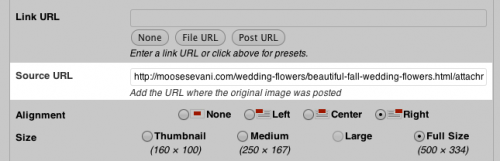
Second, you can try using the code provided by Kaspars of Konstruktors.com inside of your functions.php file which will add a “Source URL” field to every image that is uploaded through the WordPress media library. When using this method, it’s important to note that the source URL will be visible only if you specify an image caption upon inserting the image. If implemented correctly, it will look something like this.
Third, you can try using the Links In Captions Plugin by Zack Katz. After activation, you can add links to captions via the following format: {link url=”http://www.example.com”}Anchor text here{/link} Two benefits to this plugin is that it has support for the Target and Rel attributes and you can use shortcodes within the caption area.
Personally, I think Kaspars solution is the most user-friendly after the functions.php file is setup correctly. I’d like to see him package that as a plugin so more users can take advantage of it as it looks as though it was part of the media manager all along. However, the best scenario is for this functionality to some how end up within the core of WordPress. If you have the know-how, please consider contributing to the ticket or writing a better patch to get this into core.
Second, you can try using the code provided by Kaspars of Konstruktors.com inside of your functions.php file which will add a “Source URL” field to every image that is uploaded through the WordPress media library. When using this method, it’s important to note that the source URL will be visible only if you specify an image caption upon inserting the image. If implemented correctly, it will look something like this.

Third, you can try using the Links In Captions Plugin by Zack Katz. After activation, you can add links to captions via the following format: {link url=”http://www.example.com”}Anchor text here{/link} Two benefits to this plugin is that it has support for the Target and Rel attributes and you can use shortcodes within the caption area.
Personally, I think Kaspars solution is the most user-friendly after the functions.php file is setup correctly. I’d like to see him package that as a plugin so more users can take advantage of it as it looks as though it was part of the media manager all along. However, the best scenario is for this functionality to some how end up within the core of WordPress. If you have the know-how, please consider contributing to the ticket or writing a better patch to get this into core.

No comments:
Post a Comment